


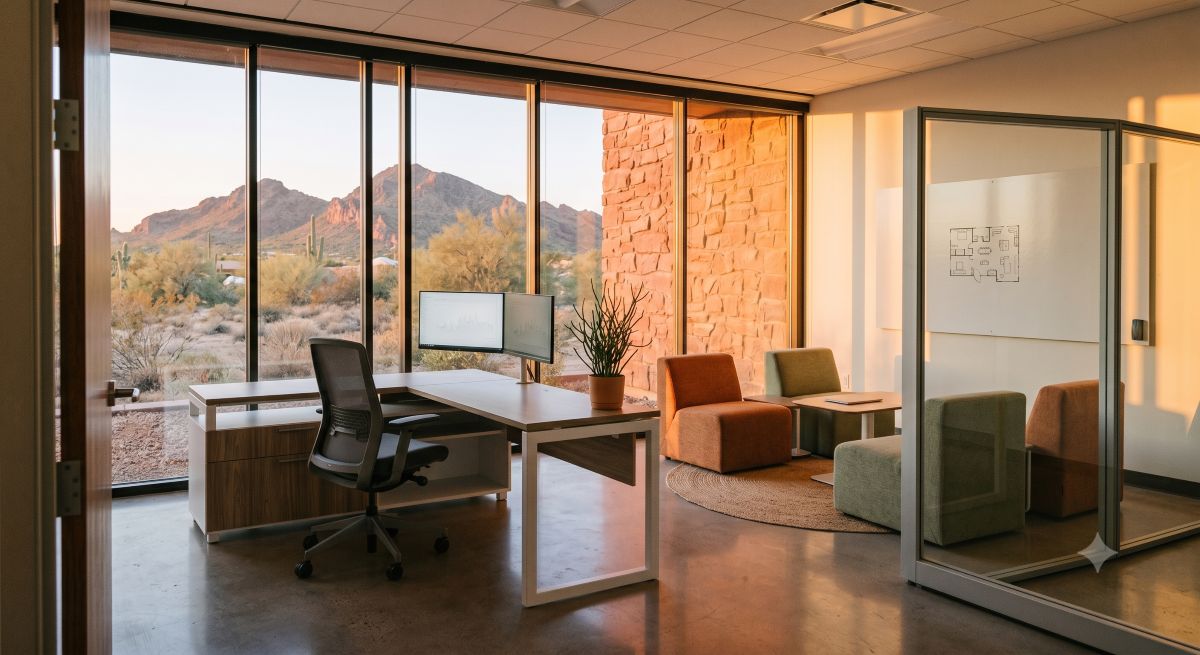
When setting up commercial office furniture in Phoenix or anywhere in the Valley, start with workstations and desks. Seating comes next, followed by conference furniture, reception pieces, and storage. Following a clear buying sequence keeps your space functional from day one and avoids the expensive rework that comes from buying out of order.
Before You Buy: Two Questions That Will Shape Every Decision
Most commercial office setup mistakes happen before anything gets ordered. Businesses either load up on the wrong things early or they push furniture decisions so late that they’re furnishing a space around a hard move-in deadline with no time to think clearly.
Two questions will define your entire furniture plan.
How many people will actually use this space, now and in the next two to three years?
This sounds obvious, but many buyers plan for today’s headcount without accounting for growth. Once you’ve committed to a workstation configuration, reconfiguring stations is more involved than most people expect. A common industry benchmark is 150 to 250 square feet per person for a standard commercial office, depending on layout style. That range accounts for the workstation, seating, circulation space, and a proportional share of shared areas like conference rooms and reception.
If you’re setting up 2,000 square feet for 10 people, you have room to work with. If you’re putting 20 people in that same space, you’re building around tighter constraints, and the furniture decisions shift accordingly.
What kind of work actually happens here?
A team of attorneys doing focused document review has completely different furniture needs than a marketing group that spends half the day in meetings and the other half on the phone. Think through:
- How much time each person spends seated at a desk versus moving between conference rooms and common areas
- Whether the work requires concentration and privacy or active collaboration and quick communication
- How clients, vendors, or visitors interact with the space, and what impression you want them to take away
- Whether any roles require specialized setups like multiple monitors, standing desks, or shared workstations
These answers determine which categories to prioritize and where it makes sense to invest more versus where a standard option will perform just fine.
With that groundwork in place, here is the sequence that works.
Step 1: Workstations and Desks
Workstations and desks come first because they anchor everything else. Their placement defines your traffic flow, determines how much room you have for common areas, and shapes which storage and supporting pieces make sense for the space.
For most commercial offices, there are two directions: freestanding individual desks or a panel-based workstation system. Freestanding desks are flexible and easier to reconfigure down the road without buying new hardware. Panel systems, which include traditional cubicles and lower-panel benching setups, create more defined structure and can pack more people into a given footprint efficiently.
The right choice depends heavily on how your team works, not just the floor plan dimensions. If your team needs focus and minimal interruption, a panel or cubicle system gives each person a clear personal zone with visual and acoustic separation. If your team runs on constant interaction and spontaneous collaboration, open benching or freestanding desks in clusters may suit the workflow better.
Desk size matters more than most buyers anticipate. A standard 60-inch desk accommodates a single monitor with room for a keyboard and a small amount of paper. Step up to 66 or 72 inches and you gain meaningful working room for dual monitors or anyone who regularly works alongside physical materials. L-shaped desks add a return surface, creating two distinct work zones within a single footprint, which is useful for people who switch between digital and physical tasks throughout the day.
For private offices, a standalone executive desk is rarely enough for how most managers and executives actually work.
Before finalizing any desk layout, confirm:
- Power access. Are outlets or floor boxes positioned near where each workstation will sit? Adding floor boxes after the fact is expensive.
- Cable management. Desks with built-in channels and wire grommets create a cleaner, safer setup from day one and age much better than desks that leave cables exposed.
- Monitor depth. Most monitors need at least 24 to 30 inches of desk depth to sit at a proper viewing distance. Verify that the desk depth supports the screen sizes your team uses.
- Circulation. Leave at least 36 inches between workstations for comfortable movement. Forty-eight inches is better in higher-traffic areas.
Step 2: Seating
Most businesses treat chairs as a mid-process decision, something to sort out after the desks are placed. That logic usually leads to underspending on the category that has the most direct daily impact on your team’s health and productivity.
Commercial office chairs are built for a fundamentally different use case than residential chairs. A home office chair is designed for light to moderate use, typically a few hours a day, often by a single person. A commercial chair needs to perform for 8 to 10 hours daily, five days a week, over multiple years, and in shared-workstation environments used by multiple users.
That difference shows up in the components. Commercial chairs use higher-rated cylinders, denser cushioning that resists compression over years of use, stronger base and caster materials, and mechanisms rated for sustained continuous load. The certification to look for is BIFMA compliance. A chair tested to BIFMA standards has passed load, durability, and stability requirements under commercial-use conditions. It’s the clearest indicator that a chair is actually built to meet the demands of a commercial office.
Adjustability matters differently at a commercial scale than it does when buying a single chair for yourself. When you’re outfitting 15 or 25 people, you’re buying for a range of bodies: different heights, builds, sitting habits, and physical needs. A chair that fits one person well may be miserable for the next. The adjustability features with the most practical impact across a diverse team:
- Seat height range: Roughly 16 to 20 inches covers most adults. Wider ranges accommodate more body types.
- Lumbar support: Adjustable in both height and depth, not fixed in place. Fixed lumbar pads hit the right spot for some users and the wrong spot for many others.
- Seat depth: Accommodates varying leg lengths, allowing both shorter and taller users to sit with proper thigh support.
- Armrests: Height-adjustable at a minimum. Width and pivot adjustment help users of different builds position their arms comfortably without hunching.
- Weight capacity: Verify that the chairs you’re ordering cover the actual range of body types on your team.
According to NIOSH ergonomics guidance from the CDC, work-related musculoskeletal disorders account for roughly 29% of all nonfatal occupational injuries, with a median of 14 lost workdays per case. Seating is one of the most direct ergonomic interventions available. Research tracked by BOSTONtec shows that organizations with proper ergonomic programs see measurable reductions in injury costs and workers’ compensation claims year over year.
Salt Creek carries commercial seating from 9to5 Seating and Global Furniture Group, both built specifically to commercial-grade durability and ergonomic specifications.
Step 3: The Conference Room
The conference room is where most commercial office buyers make their first significant mistake. They either defer the conference table to “phase two” (which often never arrives), or they buy a table that’s completely out of proportion for the room and spend the next several years shuffling chairs just to get people seated.
The core sizing rule is simple: subtract at least 7 feet from both the length and width of your conference room. That accounts for 3 to 3.5 feet of clearance on each side of the table, which is the minimum comfortable space for someone to push back a chair, stand up, and move behind a seated person without disrupting the meeting. What remains after that subtraction is your maximum table footprint.
A room measuring 15 feet by 13 feet can accommodate a table up to roughly 8 feet by 6 feet. Seating capacity follows from that. Plan for 24 to 30 inches of table edge per person. Someone with a laptop, a notebook, and a coffee needs the full 30 inches. A meeting where most people are just participating verbally can work with 24.
Table shape affects sightlines and meeting tone as much as it affects seating capacity. Rectangular tables seat the most people per square foot and work in almost any room shape. Boat-shaped tables, which flare toward the middle, improve sightlines down the length, which matters more as the table gets longer. Round and square tables work for smaller groups where egalitarian participation matters more than raw capacity.
Salt Creek’s conference table collection includes both catalog options and custom round tables built right here in Phoenix.
Step 4: Reception and the Front Office
Reception furniture earns its place in the buying sequence because it’s the first physical impression your business makes on every client, candidate, and vendor who visits. It’s easy to defer, but if you open before the reception area is properly set up, first impressions are already working against you.
Three components make up most reception setups: the desk for front-of-house staff, seating for waiting visitors, and storage for the area. Getting the proportions right matters as much as choosing attractive pieces.
The reception desk is the focal point. It’s where visitors go when they arrive, and it communicates a lot before anyone says a word. A desk that’s too small looks temporary. One that dominates the room creates a checkpoint feeling rather than a welcome. A transaction surface (typically 42 to 44 inches high) where visitors can sign in or interact, combined with a lower work area for the receptionist, is the functional standard.
Waiting area seating needs to be durable and comfortable. Reception chairs and sofas see constant use from a rotating population of visitors with no opportunity for individual adjustment. Commercial-grade upholstery and solid frame construction are non-negotiable for a high-traffic area.
Storage in reception is easy to overlook and consistently a problem once a team is working in the space. Files, supplies, brochures, and equipment all need somewhere to go that isn’t the top of the reception desk. Building storage into or behind the desk keeps visible surfaces clean and keeps the professional appearance intact.
Step 5: Private Offices and Executive Spaces
Not every commercial office includes private offices, but when they do, those rooms typically involve the most expensive individual purchases in the project and the decisions with the longest visual impact.
A standalone executive desk is rarely enough for how most executives and managers actually work. Managing screens, files, calls, and occasional in-room meetings simultaneously requires more surface area and storage than a single desk provides. The standard solution is a coordinated suite: a main desk, a matching credenza that adds a secondary work surface and enclosed storage, and in larger offices a hutch for open shelving above the credenza. Bought as a collection, these pieces share the same finish, hardware, and design language, which creates a polished, intentional look even in a modest private office.
The most important decision in buying an executive suite isn’t the desk size. It’s the finish. Once you commit to a finish, your credenza, hutch, bookcases, and eventually the conference room need to either match or consciously coordinate with it. Mixing finishes across a private office looks like an afterthought, and that perception carries into how clients and staff read the space.
Custom executive options from brands like HF Custom and Maverick Desk provide more configuration and finish flexibility than standard catalog pieces, which matters in rooms with unusual dimensions or specific aesthetic requirements.
Step 6: Storage
Storage gets underfunded in almost every commercial office project. Businesses budget carefully for desks, chairs, conference furniture, and reception, then discover a few months in that there is nowhere to put anything.
Commercial office storage falls into three practical categories, and each serves a different purpose.
Filing cabinets handle active, frequently accessed documents. Lateral file cabinets, which open side to side and hold hanging folders front-to-back, are the more space-efficient option in most commercial settings. They hold more filing capacity per square foot of floor space than vertical cabinets of comparable height. For documents that require access control, lockable laterals handle day-to-day security without the need for a separate locked room.
Credenzas bridge the gap between furniture and storage. The finished work surface on top provides a secondary zone in a private office or a clean display surface in a conference room or common area. The cabinet space below conceals files, supplies, and equipment. A credenza behind a desk turns a standard private office setup into a meaningfully more functional workspace. Positioned along a perimeter wall in an open office, credenzas define zones and add storage without taking up floor space in the middle of the room.
Open shelving and bookcases work for frequently accessed materials: binders, reference books, physical samples, and anything staff reach for regularly. The tradeoff is visibility. Open shelves look organized when they are organized and chaotic when they are not. They work best in private offices or back-of-house areas where you have more control over how they’re maintained.
A practical starting point: count your current file drawers and add 25% for growth. Add one credenza per private office. Plan open shelving for any department with heavy reference needs, like legal, accounting, or HR.
Salt Creek carries a range of file storage cabinets and bookcases in finishes suited to both private office and open commercial environments.
What Arizona Business Owners Should Know About the Buying Process
Furnishing a commercial office in the Phoenix metro involves a few things worth knowing before you start ordering.
Lead times vary significantly. In-stock showroom pieces can often be available within days. Custom-built furniture, including most executive suites and built-to-spec conference tables, typically runs four to eight weeks from order confirmation to delivery. If you have a hard move-in date, plan backward from it and build in time for shipping, delivery, and setup. Trying to rush custom furniture rarely ends well.
Seeing commercial furniture in person changes decisions. Office furniture photos rarely convey actual scale, finish quality, or how a piece functions once someone is sitting in it or working at it. Finishes read differently on a screen than in showroom light. Chairs that look ergonomically supportive in photos may not actually fit until you sit in them. For any purchase over $1,500, and definitely for executive suites and commercial seating, seeing pieces in person is worth the trip.
Salt Creek’s showrooms in Scottsdale and Gilbert carry floor samples across all major categories. Bringing a rough floor plan and your headcount to a consultation will get you a working setup recommendation rather than a list of guesses to sort out on your own.
Commercial-grade products outlast residential alternatives by a meaningful margin. A residential chair bought at a price comparable to a commercial option will not withstand 8-hour daily commercial use for more than a few years. A commercial-rated chair, bought at a higher upfront cost, will typically outlast multiple residential replacement cycles and provide measurable ergonomic support over the long term.
For broader layout-planning guidance that complements this buying sequence, the Salt Creek blog’s Ultimate Guide to Designing Your Ideal Office Space covers space-planning considerations that apply to most commercial setups in the Phoenix area.
Frequently Asked Questions About Commercial Office Furniture
What is the difference between commercial and residential office furniture?
Commercial furniture is built for sustained, high-frequency use. It’s rated for 8-plus hours of daily use by multiple people, tested to standards like BIFMA, and designed with durability as a primary specification. Residential furniture is made for lighter, intermittent home use. Both can look similar on a product page. The performance difference shows up over time, and the cost difference over a multi-year ownership period often favors the commercial option.
How much does it cost to furnish a commercial office in Phoenix?
Costs vary by category and quality tier. A reasonable rough range for a 10-person office: $1,500 to $3,000 per workstation (desk plus chair), $2,000 to $8,000 for a conference table setup, $3,000 to $12,000 for a reception desk depending on size and configuration, and $4,000 to $20,000 for an executive suite in a private office. These are estimates. A direct consultation with a furniture dealer who can see your space and understand your needs will produce a more accurate number.
Should I buy all commercial office furniture at once or phase it?
For most businesses, phasing makes sense. Workstations and chairs first, because your team needs them to work from day one. Conference furniture second, since it often has longer lead times anyway. Reception and storage third, refined once you’ve lived in the space and understood how it actually gets used. Buying everything at once is more efficient for delivery and installation logistics, but it requires having the entire floor plan finalized before you order anything.
How long does commercial office furniture last?
Well-made commercial furniture typically lasts 10 to 15 years with normal use. Commercial-grade seating often carries manufacturer warranties in the 5- to 10-year range. The lifespan depends on quality tier and how heavily the furniture is used. Shared workstations and high-traffic pieces age faster than private-office furniture used by a single person.
Can I see commercial furniture in person before ordering for a full team?
Yes. Salt Creek’s commercial office furniture team works with businesses across the Phoenix metro, with showrooms in Scottsdale and Gilbert where you can walk through and test pieces before committing. For larger purchases, it’s worth calling ahead so the team can have relevant pieces staged for your visit.